

Get Gophin on Your Phone
Add Gophin to your phone in seconds—no app store needed.
You Already Have Gophin!
Gophin is already installed on your device. Open it or tap below.
Open GophinInstall in 4 Easy Steps
Open Gophin in Safari
Go to gophin.app in your Safari browser.
Tap the Share Button
At the bottom of Safari, tap the share icon (square with an arrow pointing up).
Tap "Add to Home Screen"
Scroll down in the share menu and tap "Add to Home Screen".
Tap "Add" — Done!
Gophin will appear on your phone like any other app. Open it anytime with one tap.
Open Gophin in Chrome
Go to gophin.app in your Chrome browser.
Tap the Menu
Tap the ⋮ three-dot menu in the top-right corner.
Tap "Install App"
Select "Install app" or "Add to Home Screen" from the menu.
Tap "Install" — Done!
Gophin is now on your phone. Open it anytime with one tap.
Visit Gophin
Open gophin.app in Chrome, Edge, or Brave.
Click the Install Icon
Look for the install icon in the address bar (right side), or click ⋮ > "Install Gophin".
Click "Install"
A confirmation dialog will appear. Click "Install".
Done!
Gophin opens as a standalone window. Pin it to your taskbar or dock for quick access.
What You Get
Instant Access
Launch Gophin from your phone with one tap—no browser, no searching.
All Your Data in One Place
Every PR, every race, every season—automatically tracked and organized. No manual entry.
Always Up to Date
No manual updates. Gophin refreshes automatically—you always have the latest version.
No Credit Card Needed
Start tracking your swim times right away. No payment info required—just create an account and go.
Your Dashboard, Always on Your Phone
All your swim data, always one tap away.
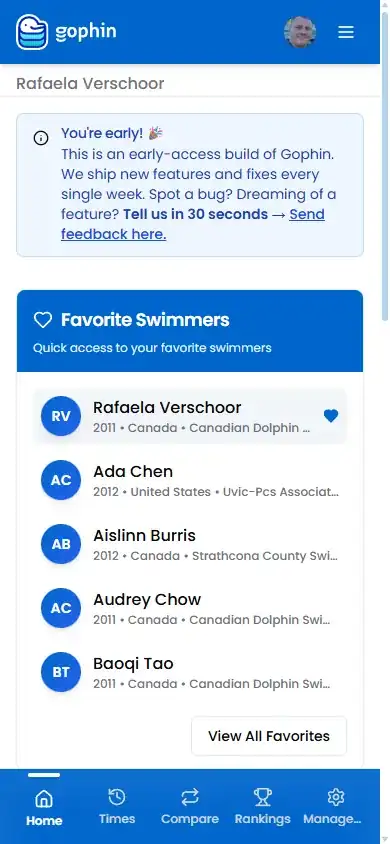
Swimming analytics you can trust. Track your times, see your progress, and compare to official standards.

Frequently Asked Questions
A Progressive Web App (PWA) is a website that works like a native app on your phone. It lives on your phone like any other app, and updates automatically—without needing the App Store or Play Store.
Yes. A PWA runs in your browser's secure sandbox—it can't access your files, contacts, or other apps. It has the same security as visiting a regular website. Gophin uses HTTPS encryption for all data.
Barely. Gophin uses less than 5 MB—lighter than a single photo on your phone. Compare that to hundreds of MB for typical app store downloads.
Yes, just like any app. On iPhone, long-press the icon and tap "Remove App". On Android, long-press and drag to "Uninstall". No leftover files, no residual data.